Self-hosted or Apple Intelligence · Open source

News,
distilled.

NewsGator reads your RSS feeds and your newsletter inbox, merges every article covering the same event into one Story, and hands you a headline and a 60-second summary. Want the full piece? One tap sends you to the real publisher's page — ads and all, because they did the reporting. No server to run? Turn on Apple Intelligence and it works standalone.

🗞️ Merge the noise ⚡ The quick hit 🔗 Publishers get the click 🧠 Apple Intelligence, no server
★ View server on GitHub 🍎 Native iOS & macOS app See how it works ↓
Why it exists

Built out of
daily frustration.

I read the news every day, and it always felt like a struggle. I searched for the right app for years and never found it. this is the result.

— the author, after one RSS reader too many

The problem

In 2026, news is
a firehose.

We are submerged. Knowing what to read is harder than reading itself — and the classic RSS workflow makes it worse, not better.

01

Drowned in feeds

You subscribe to many sources because you want different angles — and get hundreds of items a day. Nobody has that time. So you skim, anxious, sure you're missing what matters.

02

The same story, five times

Every outlet covers the same event. You read one, then a second — and the other three become pure noise you still have to wade through and dismiss, every single day.

03

The clickbait toll booth

A catchy title, an intro that says nothing. Click to the site, dismiss the cookie banner, scroll past the ads… to discover there was nothing in the article. Time is the most precious thing you have.

What actually changes

Four things that change
how you read the news.

Not another reader with more buttons. These four ideas are the whole point.

01 · MERGE THE NOISE

Twelve outlets, one Story.

Every article about the same real-world event — from twelve different outlets — collapses into a single, versioned Story instead of twelve entries in your feed. New facts update it in place; it never comes back as fake "unread" noise.

embedding + clustering, same event → same Story
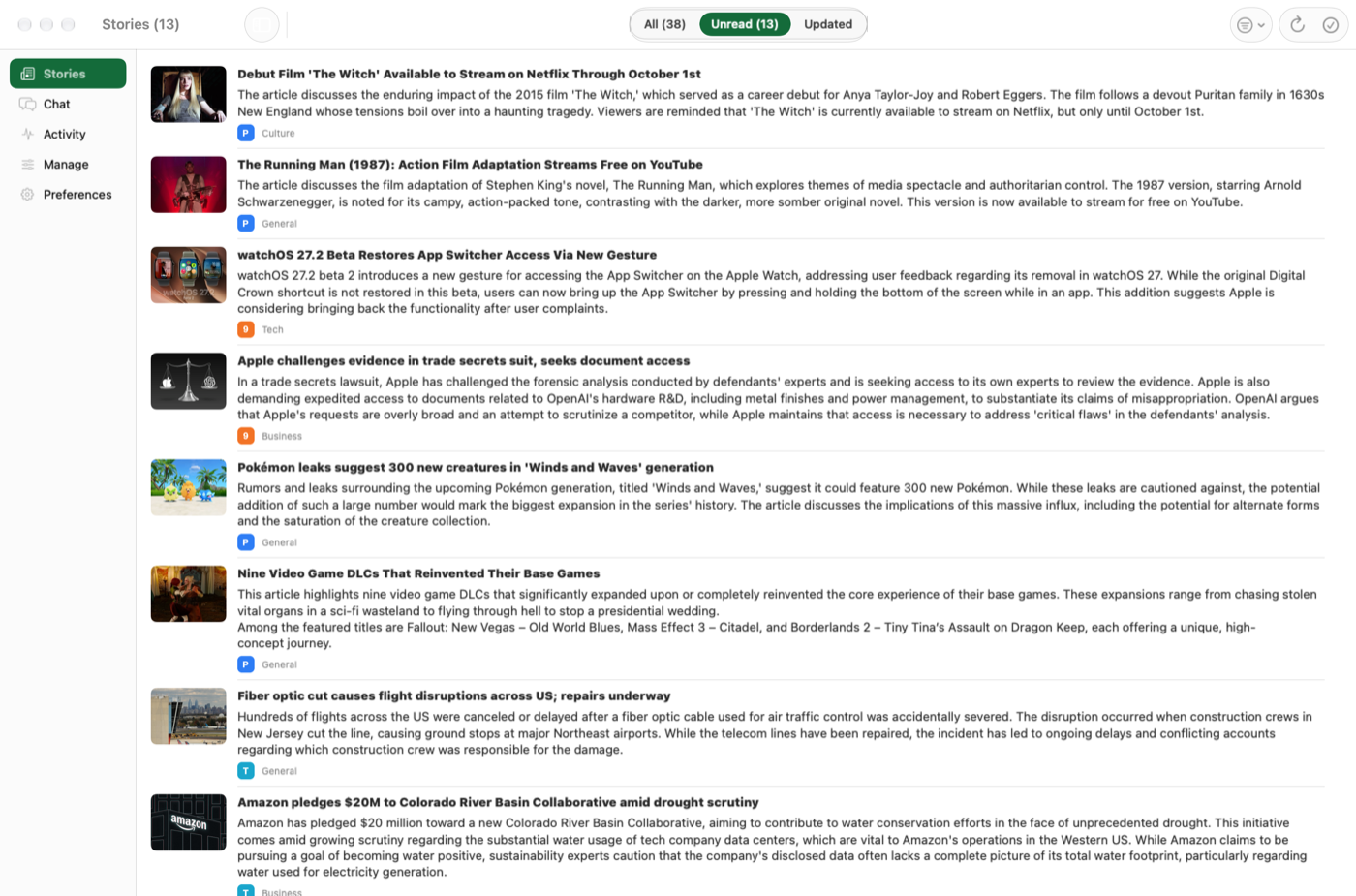
Stories list — one card per event, not per article
02 · THE QUICK HIT

An honest headline. A 60-second summary.

No clickbait, no "you won't believe what happened next." Just what happened, who's involved, and why it matters — in your language, however many languages the sources were written in. Swipe through a whole day in a couple of minutes.

swipe left = read → next · swipe right = back
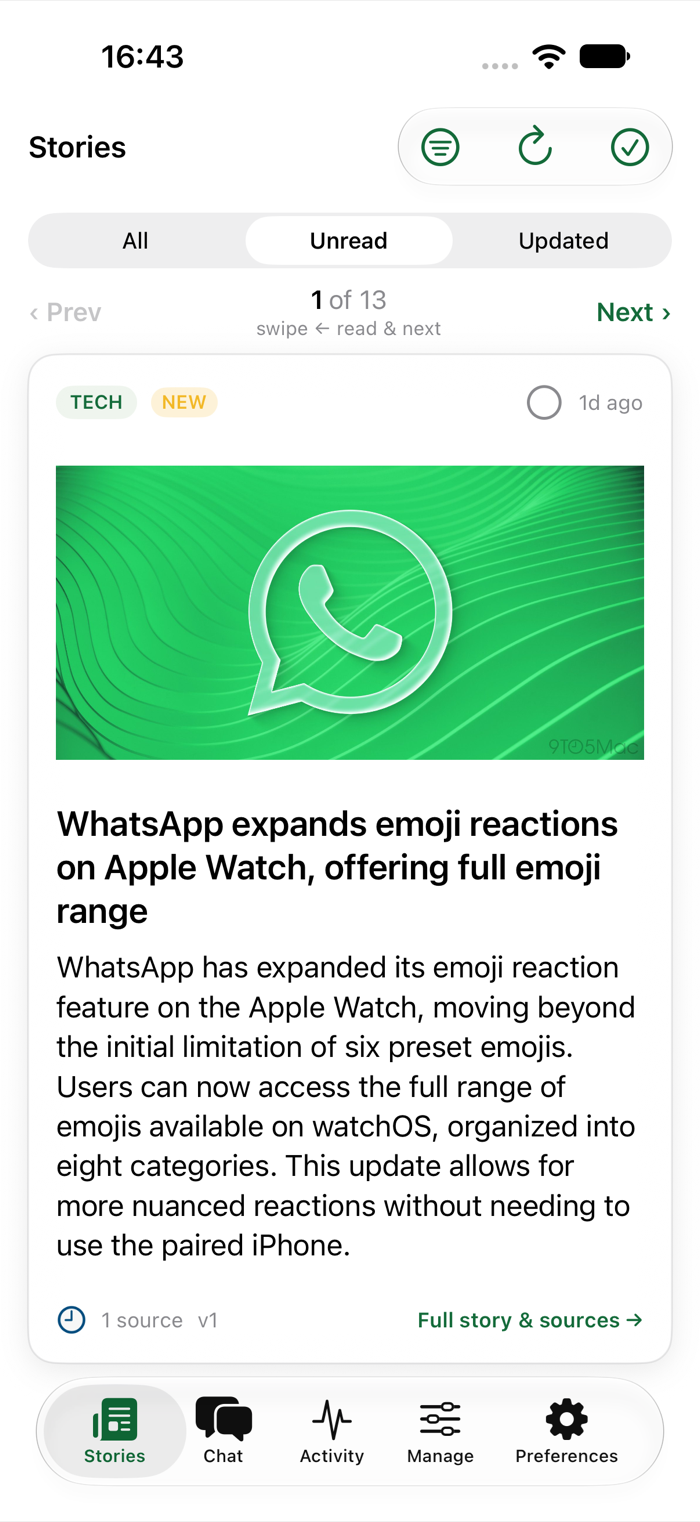
A Story card with an honest headline and a short summary
03 · SUPPORT THE REPORTING

Want the full story? Go straight to the publisher.

The summary is a filter, never a replacement. One tap opens the actual publisher's page — their layout, their ads, their subscription prompts, all intact. They did the reporting; they get the visit and the ad impression. No paywall bypassing, ever — the deal is a fair one.

"Read Original Source" → the real site, unmodified
A source article opened in-app, loading the real publisher's website
04 · NO SERVER NEEDED

Don't want to host anything? Run it on Apple Intelligence.

The self-hosted server is one way to run NewsGator — for people who can and want to run a box with an LLM. For everyone else, the native iOS & macOS apps run the entire pipeline on-device: Apple Private Cloud Compute first, the on-device model as fallback. No server, no third-party AI, ever.

Private Cloud Compute → on-device model · nothing else
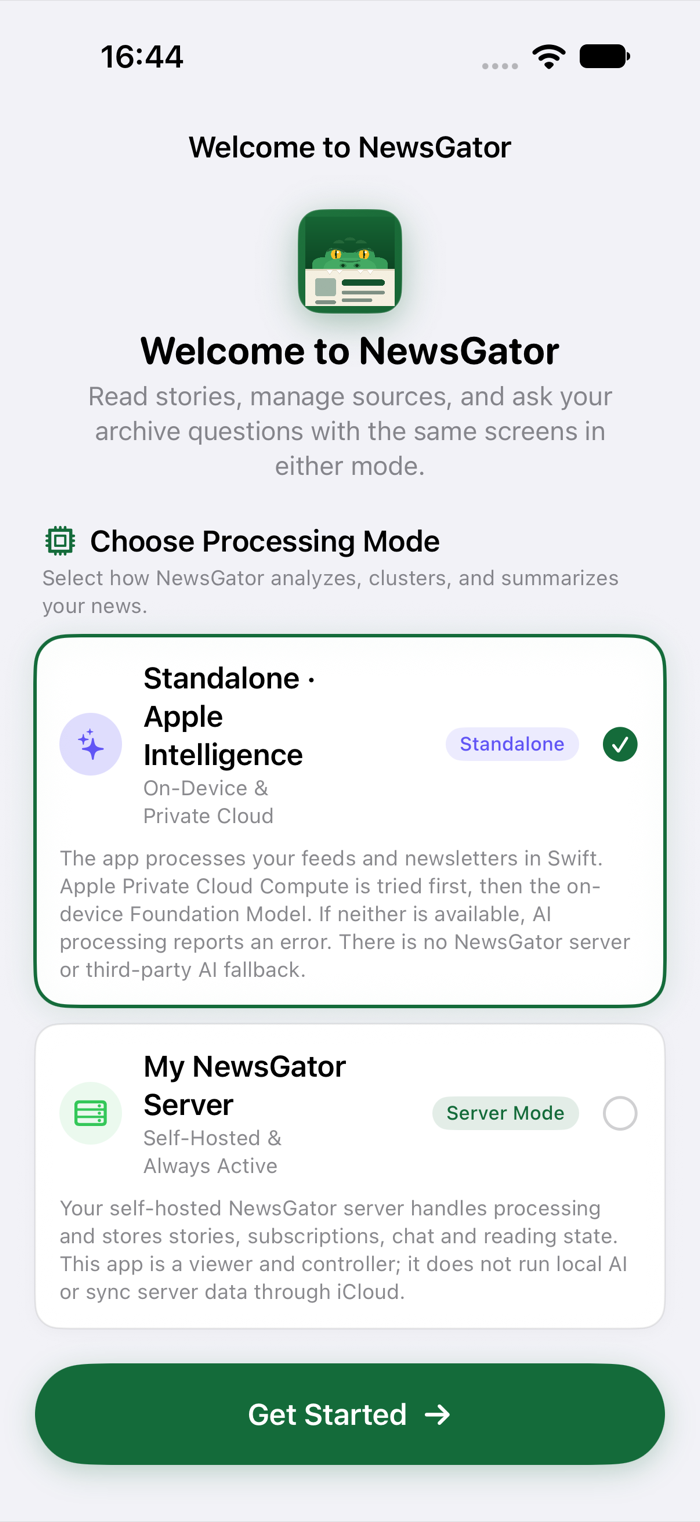
Choosing Standalone · Apple Intelligence mode instead of a server

This is not a way to read the news.
It's a way to choose the news worth reading.

🧭

A filter, not a destination

The summary exists to help you decide, never to replace the article. The last step is always the same: open the piece and read it for real.

🔗

Sources, always

Every Story lists every source it was built from, one tap away. Publishers did the work — they deserve the click, the ad impression, and your attention.

⚖️

Honest about AI

Summaries can be wrong. Models can be biased. No claim of truth here — just a triage tool. Trust, then verify at the source.

One app, two engines

Bring your own server.
Or bring none at all.

The same Stories, chat, and reading experience — powered by whichever engine fits your household.

Power users

Self-hosted server

One Docker container you run yourself. Full multi-user support, any OpenAI-compatible LLM, full observability.

  • Works with any OpenAI-compatible server — oMLX, Ollama, llama.cpp, LM Studio, or a paid API
  • Multi-user, per-user read state, languages, and feed subscriptions
  • SvelteKit web app + PWA, live activity stream, token-usage dashboard
  • Newsletter (IMAP) and third-party reader (FreshRSS/Miniflux/Inoreader) ingestion

Here's the idea: the server is one way to run NewsGator — for the people who can, and want to, host a box with an LLM on it. It's powerful, it's multi-user, and it's the deepest option. But it's not for everyone, and it shouldn't have to be.

For everybody else, there's the standalone mode. It needs exactly one thing: one Apple-Intelligence-capable device at home — an iPhone, iPad or Mac. Because reading state and the story library sync through your own iCloud account, that single capable device is enough to unlock the same clustering, summarizing and chat features for every other device signed into the same account — no primary device, no server, no coordinator required. Point an older iPad that can't run Apple Intelligence at your library, and it reads Stories that a newer iPhone quietly built in the background.

Same pipeline. Same Stories. Same honest summaries. You just get to pick who does the thinking: your own server, or Apple's.

How it works

From XML firehose
to a handful of Stories.

You give it RSS feeds. It does the boring, repetitive part.

📡

Ingest RSS / ATOM / IMAP / READER APIS

Polls your feeds like any reader — plus your newsletter mailbox (each sender becomes a feed, the LLM strips the footer/sponsor chrome and keeps the human-written intro) and third-party reader accounts (FreshRSS, Miniflux, Inoreader…) with bidirectional read-state sync. Nothing is ever lost, even across restarts.

📄

Full-text fetch PAST THE TEASER

Goes and gets the real article content — not the three-line RSS teaser designed to make you click. Images included, never behind a paywall workaround.

✍️

Summarize YOUR LANGUAGE

An LLM writes an honest headline and a compact summary — in the language you actually think in, whatever the source wrote in, with on-demand translation for sharing.

🧬

Embed & cluster DEDUPE BY MEANING

Each article is embedded and compared against existing Stories. Same event? It joins that Story instead of creating noise — and if it brings new facts, the merged summary and headline are refreshed.

☕

You read THE QUICK HIT

Open the app, scroll or swipe through a handful of Stories in about a minute, and deep-dive the ones that matter — at the source, on the publisher's own page, as it should be.

💬

You ask CHAT YOUR ARCHIVE

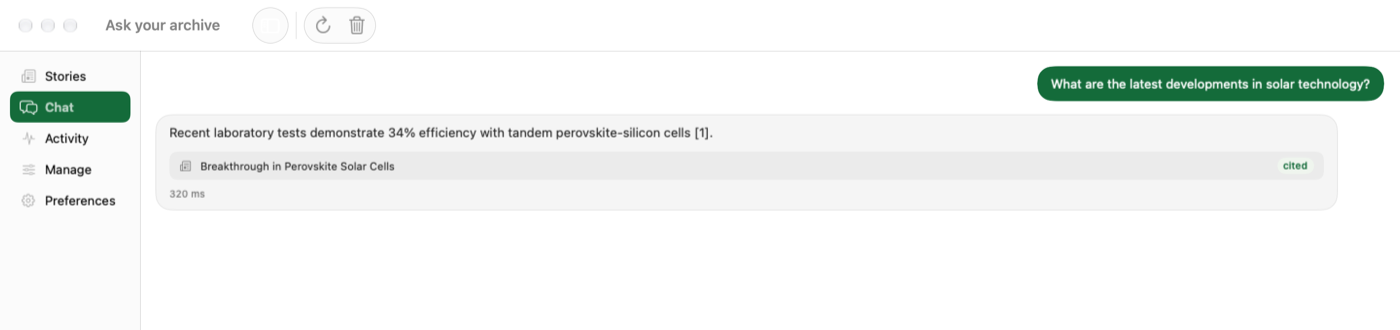
Not sure where you read something? Just ask. Your question is matched against every Story by meaning, and the answer cites its sources as clickable cards — so you can jump straight to the original.

Using it, every day

Open. Swipe.
Deep-dive.

A web app on your desktop, native apps on iPhone and Mac. Stories you skipped stay read; Stories that gained new facts come back badged "updated" — never as fake unread.

🌐 Web app (self-hosted server)
screenshot coming soon — Stories list, desktop web app
The Stories list. One card per event — not per article. Honest headline, summary, source logos, reading time.
screenshot coming soon — Story detail, desktop web app
Inside a Story. The merged summary, then every source — one tap sends you to the publisher, where the real reading happens.
screenshot coming soon — mobile swipe deck (PWA)
The swipe deck. On touch devices, Stories become cards: left = read, right = back. Triage a whole day in two minutes.
🍎 Native apps · Mac & iPhone (server or standalone)
Ask your archive — a chat that cites the Stories it's grounded in
Ask your archive. A grounded chat over everything you've read — every answer cites clickable Stories, on Mac and iPhone alike.
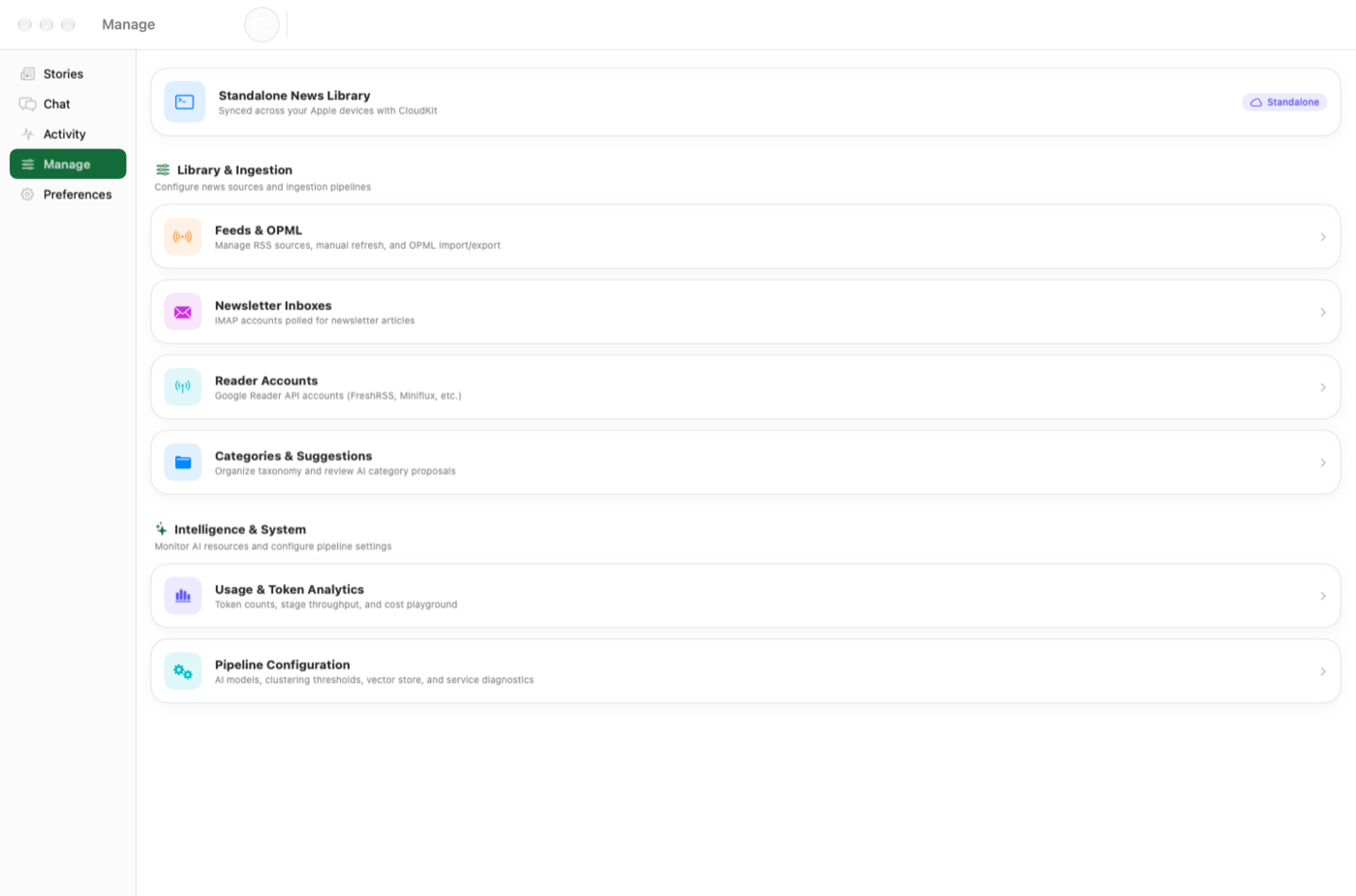
Manage feeds, newsletters, reader accounts, categories, and the AI pipeline
Everything in one place. Feeds, newsletters, reader accounts, categories, and — only in standalone mode — the on-device AI pipeline itself.
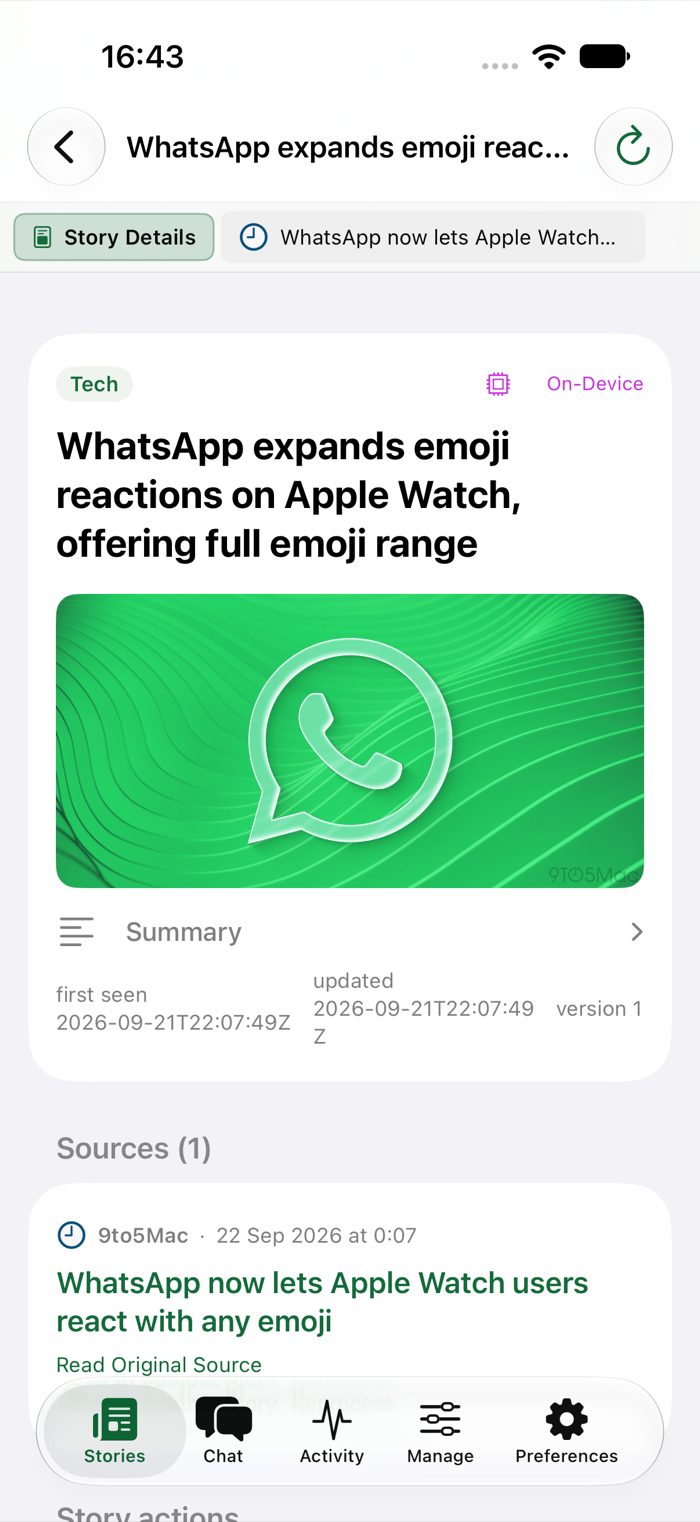
A Story detail on iPhone with a clear Read Original Source link
Read Original Source. Always one tap away, always the real publisher page — right there on the story detail screen.
And the little things

Built for one user.
Polished for many.

🗞️

Story clustering

Duplicate coverage merges into one Story with a versioned, evolving summary.

✉️

Newsletters are feeds too

Point an IMAP folder at your newsletters — per user, read-only — and they join the same pipeline as any feed.

🔄

Third-party readers

Bring an existing FreshRSS, Miniflux or Inoreader account — read state syncs both ways.

💬

Chat your archive

Ask questions across everything you've loaded — the answer is grounded in your Stories and cites its sources.

🌍

Your language(s)

Headlines and summaries in the language you configure, with cached on-demand translations per reader.

📤

Share, translated

Share a Story to family in their language — the link goes straight to the original sources.

📑

Readeck export

One tap pushes a permanent, self-contained copy to your Readeck instance.

👁️

Honest read state

Read stays read. New facts on a read Story badge it "updated", never unread.

👥

Multi-user (server)

Admin-managed accounts; every reader has their own feeds, read state, and language.

📱

PWA + native apps

Installable web app on iOS & Android, or the native SwiftUI app on iPhone, iPad and Mac.

🗂️

Story RSS feed

Your distilled Stories are themselves an RSS feed — read them back in any reader you like.

📈

Full observability

Live activity stream of every pipeline decision, a real-time LLM interaction trace, and a usage dashboard.

Your stack, your rules

Cheap to run.
Yours to keep.

  • Any OpenAI-compatible LLM — oMLX, Ollama, llama.cpp, LM Studio, or a paid API. No provider lock-in, ever.
  • Or no LLM to run at all — the native app's standalone mode uses Apple Intelligence instead.
  • No genius model needed — summarizing articles is a modest task; a small local model does it well.
  • Metered from day one — tokens and latency logged per call; a price playground estimates what a paid API would cost.
# that's the whole server install $ git clone …/NewsGator && cd docker $ cp .env.example .env # LLM_BASE_URL → your server $ docker compose up --build # → http://localhost:3000 # …or skip all of this: install the native app # and switch to Standalone · Apple Intelligence.

Stop drowning.
Start choosing.

Free and open source. Self-host it, or run it on Apple Intelligence. Either way — no ads, no cookie banner, and the publishers you actually read still get the click.